By Ryan Mitchell | Updated: Dec 13, 2025
Editor’s Note: This guide was updated in late 2025 to reflect the latest Tangem(Links may be affiliate links) App interface changes and the Polygon network’s transition from MATIC to POL tokens. While Tangem wallet now supports a wider range of networks (including Hyperliquid EVM and Polygon zkEVM), the core troubleshooting steps for a failed swap remain consistent across all EVM chains. Always ensure your app is updated via the App Store before attempting complex transactions.
It’s a frustrating scenario: You hit the swap button on your Tangem Wallet, authorize the transaction with your card, and… nothing happens. Or worse, you see a vague error like “Provider unavailable.”
As a hardware wallet researcher, I see this issue constantly. Many users consider Tangem one of the best cold wallets because of its card-based security, but confusion arises around its swap mechanics. Here is the technical reality: The Tangem wallet app does not operate its own built-in exchange system. It relies on third-party aggregators via Tangem Express (like Changelly, 1inch, and ChangeNOW). When those APIs fail, or when network congestion hits, your swap dies.
In this guide, I will walk you through exactly why this happens and how to fix it, from checking gas fees to bypassing the swap feature in Tangem wallet entirely.
Quick Diagnostic: Why Did My Swap Fail?
Before diving deep, check this table. 90% of Tangem Polygon swap failures fall into these three categories.
| Error Message / Symptom | Likely Cause | The Fix |
|---|---|---|
| “Fee exceeds balance” | Zero MATIC/POL for network fee | Buy 1-2 MATIC on an exchange and send it to your wallet address. |
| “Provider Unavailable” | API Maintenance | Switch swap providers (e.g., from Changelly to 1inch) inside the app. |
| “Awaiting Deposit” (Stuck) | High Traffic | Do nothing. Wait for the blockchain network to clear. |
| Transaction Disappears | API Timeout | The provider rejected the quote. Refresh and try again. |
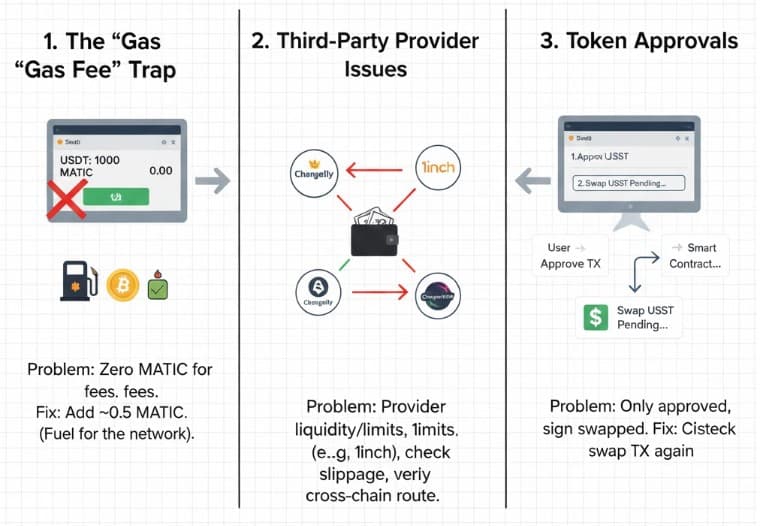
Root Cause 1: The “Gas Fee” Trap (Zero MATIC)
This is the #1 reason for a failed swap. On the Polygon network, every interaction—whether it’s a token swap or a smart contract approval—requires the network’s native coin (MATIC or POL) to pay the transaction fee.
You cannot pay for Polygon gas with USDT, Ethereum, or Bitcoin.
- The Scenario: You have 1,000 USDT on Polygon and want to swap it for BTC.
- The Problem: You have 0 MATIC in your crypto wallet.
- The Fix: You must deposit at least 0.5 to 1 MATIC. Without this “fuel,” the blockchain technology will reject your request.
Note: Unlike a centralized exchange that deducts fees from the trade, a self-custodial wallet app requires you to hold the native asset for the network commission.
Root Cause 2: Third-Party Provider Issues
The Tangem App acts as a gateway. If Changelly or 1inch pauses Polygon swaps due to liquidity issues, your swap will fail. Tangem is one of the few wallets that aggregates multiple providers, giving you options.
How to Fix It:
- Switch Providers: On the swap screen, tap the “Provider” section. If it defaults to Changelly, try switching to 1inch or ChangeNOW.
- Check Slippage: During high volatility, a standard 0.5% slippage might be too low.
- Cross-Chain Limits: Are you trying to swap Polygon USDT to Tron tokens? Cross-chain swaps are complex. Ensure the provider supports that specific bridge route.
Root Cause 3: Token Approvals (The “Silent” Step)
Before a smart contract can swap your tokens, you must give permission to spend them. This is a separate on-chain transaction called an “Approve” or “Allowance” transaction.
- Symptom: You paid the commission, but the swap didn’t happen.
- Analysis: You likely only paid for the swap permission, not the actual trade.
- Solution: Check your transaction history. If you see a confirmed transaction but your balance hasn’t changed, you just finished the permission to use step. You need to hit “Swap” one more time.
The “Nuclear Option”: Using WalletConnect (100% Success Rate)
If the built-in swap feature is completely broken, do not panic. Your digital assets are safe. You can bypass Tangem’s interface entirely and connect directly to a Decentralized Exchange (DEX) like Uniswap and Pancakeswap.
This method uses WalletConnect—a secure bridge that connects your wallet to dapps.
Step-by-Step Bypass:
How it works: Instead of relying on Tangem’s API to route your trade, you connect your wallet to dapps directly. This method uses via WalletConnect in Tangem—a secure, industry-standard protocol that links your cold storage to Web3 apps without exposing your private keys. It is the ultimate fail-safe for advanced users.
Step1
Open your browser and go to Uniswap (ensure you are on the legitimate site).
Step2
Click “Connect” and select WalletConnect.
Step3
A QR code will appear. Open your Tangem App, tap “Scan,” and scan the code.
Step4
On your phone, connect Tangem wallet.
Step5
Perform the swap on Uniswap’s interface.
Step6
Sign the transaction on your Tangem card when prompted.
Why this works: This cuts out the middleman API. You are interacting directly with the EVM chain. This works for Ethereum, BNB Smart Chain, Avalanche, Solana, and Polygon.
Technical FAQ: Ryan’s Troubleshooting Archive
Can I swap Bitcoin (BTC) for Polygon tokens directly?
Yes, but this is a “cross-chain” swap. It takes longer (20-60 minutes) and costs more in commission. Native swaps (e.g., MATIC to USDC on Polygon) are usually instant due to low fees.
My USDT balance shows, but I can’t swap it.
Check which network your USDT is on. Tangem supports USDT on Tron, Solana, Ethereum, and BNB Smart. You cannot swap BNB Smart Chain USDT using Polygon MATIC for gas. Sending to the wrong network is a common error.
What if I send via swap to the wrong address?
Blockchain transactions are irreversible. If you manually edited the recipient’s address during a “send via swap” operation, the funds are likely unrecoverable. Always double-check.
Why are gas fees so high?
Even on L2 scaling solutions like Polygon, congestion happens. If the network is busy, the higher fees are unavoidable. You can either pay the premium or wait.
Does Tangem support newer networks?
Yes, Tangem wallet now supports a vast array of chains. Recently, Tangem has introduced support for networks like Hyperliquid EVM, Polygon zkEVM, and Ethereum Classic. However, always check the Tangem blog or Tangem support for the latest list.
Is it safe?
Yes. Tangem is a cold wallet that protects your wallet from unauthorized access. Your private key never leaves the card. This wallet combines ease of use with banking-grade security, which is why app store ratings are generally high.
What if I need to send the funds back?
If a swap fails mid-way (e.g., cross-chain), the provider will usually refund you. However, you may need to contact their support team with your transaction ID from a blockchain explorer.
How do I get updates?
Updates to the Tangem app are crucial for fixing bugs. Always check the App Store or Google Play to ensure you are on the latest version.
Still stuck? If you cannot send cryptocurrency or funds to an exchange, contact Tangem wallet support or visit the Help Center.