If you need Tangem help, whether for wallet setup, troubleshooting, or security questions, understanding the available support options is crucial for a smooth experience with your hardware wallet. Tangem provides customer assistance primarily through digital channels, focusing on email support and a comprehensive online help center to serve their global user base.
Official Tangem Support Channels
Email Support
The primary way to get Tangem(Links may be affiliate links) help is by contacting their support team via email at [email protected]. This channel handles inquiries related to wallet activation, transaction issues, lost or damaged cards, and technical problems.
When emailing support, be prepared to provide detailed information to expedite your case:
- Your wallet type and version
- Description of the problem or question
- Any error messages or screenshots
- Order number if relevant
Response times generally range from 24-48 hours on business days, with complex issues potentially taking longer. For sales and order questions, contact [email protected] specifically.
Online Help Center
Tangem hosts an extensive and well-organized Help Center on their official website. This resource contains step-by-step guides, troubleshooting articles, FAQs, and setup instructions covering common wallet issues.
Visiting the help center first often allows users to resolve problems quickly without waiting for direct support. Topics include card initialization, enabling NFT support, connection errors, wallet recovery, and transaction troubleshooting.
Support Ticket System
On the Tangem website, users can submit support tickets that document their case with evidence such as screenshots and wallet details. This system tracks issues to resolution and allows ongoing communication with Tangem staff.
Tickets provide better coordination when resolving technical problems that require back-and-forth interaction or escalation to product teams.
What Kind of Tangem Help Is Available?
Wallet Setup and Initialization
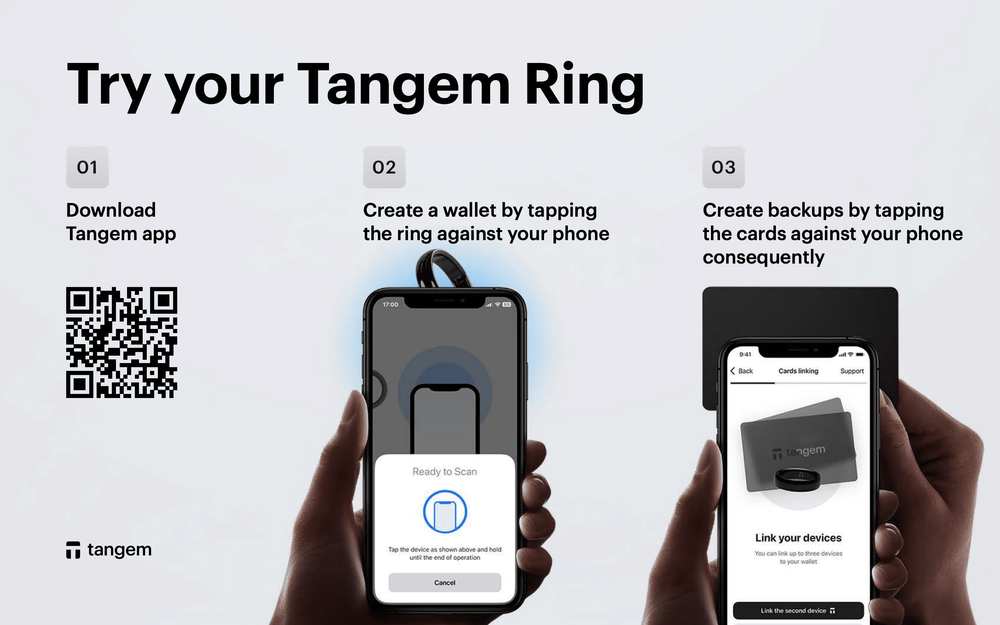
Help is available for new users needing assistance with downloading the app, initializing cards, and understanding the seedless backup system. The process takes only a few minutes but getting clear guidance improves confidence and reduces setup errors.
Troubleshooting Card Connectivity Issues
Users facing problems scanning their Tangem cards via NFC receive guidance on enabling NFC on their smartphones, cleaning cards, compatibility, and trying alternate devices. Persistent connection failures can then be escalated via support email or ticket.
Transaction and Transfer Support
Tangem help includes assistance with transaction failures, missing funds, unconfirmed transfers, and blockchain sync issues. Users are advised to provide transaction IDs and blockchain explorer links for fast diagnostics.
Recovery and Backup Inquiries
Questions about lost seed phrases, backup card configuration, and wallet restoration are common support topics. Tangem’s seedless backup with multiple identical cards simplifies recovery but requires physical security of backup cards.
For users who created or imported a seed phrase, support assists with safe restoration procedures.
Common Issues Reported and Their Solutions
- Card not scanning: Enable NFC, clean the card and your phone, remove phone cases, try another device, update app.
- Missing transactions: Check blockchain explorers, refresh app, verify correct network.
- Backup errors: Ensure secondary cards are new, update app, contact support with error details.
- Order delays or issues: Email Tangem store support with order number for tracking or refund requests.
Beware of Fake Tangem Support Numbers
Tangem does not offer phone support. Any phone numbers claiming to be Tangem customer service are scams attempting to steal wallet keys. Always use official support emails and the website for contact.
Never share your private keys, seed phrases, or allow remote access to your devices with anyone claiming to be Tangem support over the phone or unverified channels.
Tips for Efficient Tangem Help Requests
- Provide detailed descriptions, error codes, and relevant screenshots.
- Include your operating system, app version, and wallet model.
- Mention previous troubleshooting steps you tried.
- Be patient during high-demand periods; allow 24-48 hours for a reply.
- Use official support channels exclusively to protect your wallet security.
Alternative Support Resources
- Community forums and Reddit: Peer advice but beware of unverified info.
- YouTube tutorials: Visual guides from cryptocurrency educators.
- Beginnerwallets.com: Detailed tutorials and troubleshooting on Tangem products.
Summary
Tangem help is primarily accessed through official email addresses [email protected] for technical issues and [email protected] for sales inquiries, supplemented by an extensive online help center and ticketing system. No phone support exists, so beware of scam callers. Effective support interactions require providing detailed case information and patience for response times. Utilizing official resources and community knowledge empowers users to resolve most Tangem wallet issues safely and confidently.