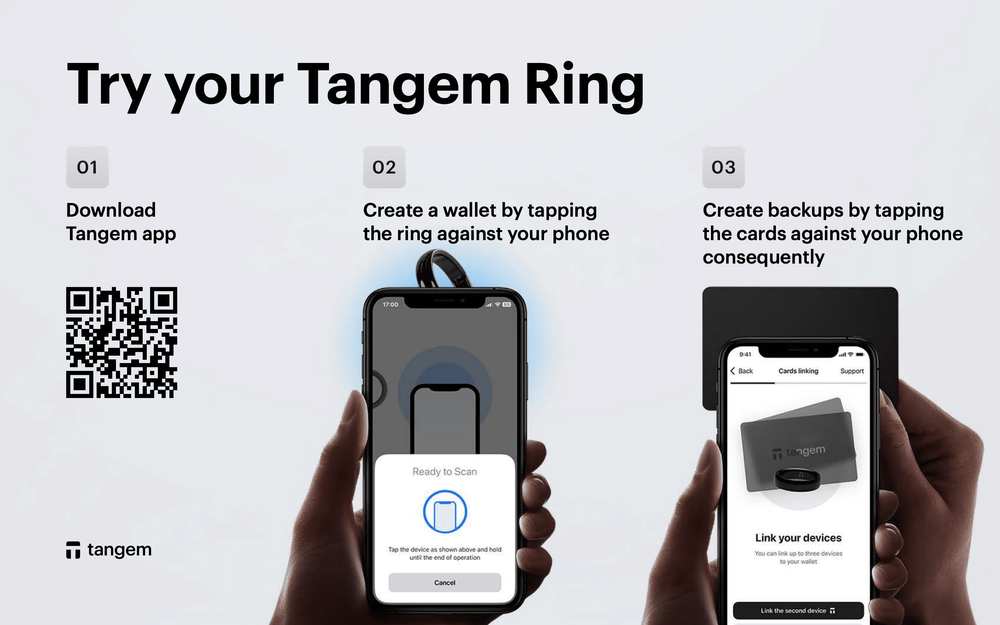
Tangem wallet users rely on secure, self-custody hardware wallet solutions to protect their valuable cryptocurrency assets. When technical issues arise, fast and reliable official tech support becomes crucial. This guide covers everything you need to know about how to access and use the official technical support for Tangem wallet, including all available support channels, how to prepare before contacting support, and answers to frequently asked questions.
How to Access Official Tangem Wallet Tech Support
1. Official Email Contact
For most technical inquiries related to Tangem(Links may be affiliate links) wallets—including hardware issues, firmware updates, transaction troubleshooting, synchronization problems, or account questions—email is the primary channel. You can send detailed support requests to:
When emailing, provide critical details to expedite resolution:
- Your Tangem wallet card identification number (found on the card or in the app settings)
- Firmware version (visible in Tangem Wallet app under device info)
- Detailed problem description
- Any relevant transaction IDs or screenshots
- Your smartphone model and operating system version
Tangem’s support specialists typically respond within 24 to 48 hours on business days.
2. Tangem Wallet App Support
The Tangem Wallet App (available for iOS and Android) integrates built-in support functionality, enabling you to submit support tickets directly within the app’s settings section. This in-app support centers your device and app information automatically in the ticket, providing Tangem’s team with necessary context upfront.
Using the app to submit tickets often results in faster processing and helps avoid issues like wrong email addresses or incomplete details.
3. Official Website Help Center
Tangem’s official website (tangem.com) contains an extensive Help Center and FAQ repository covering common technical questions, setup guides, troubleshooting protocols, and usage tutorials.
Before contacting support, check the Help Center to see if your issue is addressed by step-by-step guides or knowledge base articles. This can save you time and provide immediate solutions.
4. Community Support Channels
While not official tech support, Tangem’s active Telegram groups and Reddit community serve as valuable peer support forums. Experienced users and moderators share troubleshooting tips, firmware update notices, and product usage advice.
Popular groups include:
- Tangem Official Telegram channel
- r/Tangem subreddit on Reddit
Use community channels for general questions, tips, and fast responses but for account-specific or security-related issues, always consult official support.
What to Prepare Before Contacting Tangem Tech Support
- Tangem card serial number: Located physically on your Tangem card or digitally in app device info.
- Firmware version: Check the app under device info, critical for firmware-related issues.
- Device details: Smartphone model, operating system version, app version number.
- Exact error messages: Provide screenshots or exact text of any errors or alerts.
- Transaction details: Include transaction hash, blockchain network used, wallet addresses involved if your issue relates to transactions.
- Detailed problem description: Explain the issue thoroughly including steps to reproduce it if possible.
Providing this information upfront accelerates machine diagnosis and reduces turnaround times for resolving your problem.
Frequently Asked Questions (Q&A) about Tangem Wallet Official Tech Support
Q: How quickly can I expect a response from Tangem support?
A: Tangem’s support team typically replies within 24-48 hours during standard business days. Response times may be longer on weekends or during peak volumes.
Q: Does Tangem provide phone support?
A: No, Tangem focuses on written support channels like email and in-app tickets to ensure detailed communication and accurate documentation of your issues.
Q: What should I do if my Tangem wallet card is lost or damaged?
A: Use your backup Tangem cards if you have them. Contact support immediately to understand your recovery options. Do not share private keys or seed phrases with support staff—as Tangem never requests these.
Q: How can I update Tangem wallet firmware?
A: Firmware updates are delivered via the Tangem Wallet app. Follow the built-in update prompts under device settings. If you encounter issues during firmware updates, contact official support for assistance, including error messages and device details.
Q: What if my transaction isn’t reflected in my Tangem wallet?
A: First, confirm the blockchain transaction with the provided transaction ID on a block explorer. Then ensure you are viewing the correct blockchain network and latest wallet version. If issues persist, submit a support ticket with full transaction details.
Q: How do I know if I am contacting official Tangem support?
A: Always use [email protected] or the in-app support feature. Be wary of phishing attempts from unofficial channels asking for sensitive information. Tangem representatives never request your private keys, seed phrase, or passwords.
Tips for Efficient and Safe Support Interactions
- Be concise but thorough in your descriptions to avoid back-and-forth.
- Attach screenshots showing the issue clearly.
- Never share private keys or seeds—these are never asked for in official support.
- Keep records of your existing support tickets and communications.
- Use official channels exclusively to avoid scams.
By following this guide, Tangem wallet users can navigate the official technical support ecosystem efficiently, ensuring fast, secure resolutions that keep their cryptocurrency assets safe. Whether you are setting up your wallet for the first time, troubleshooting transactions, or updating firmware, official Tangem tech support is your reliable partner.